
Always build in a fail-safe even if you think you don’t need it
Photography catastrophe, when pictures are lost
Over the years we have seen some drama and photography catastrophes. As most of you probably know, Annewiek and I ran an IT company for most of our lives. One of our specialities was building custom machines. But also being very aware of the risks people experience online and offline. Today, maybe one of the most important pieces of advice I can give to everyone that shoots tethered or just wants his/her images safe.
It’s heartbreaking to see a 70+ year old crying in the store because they lost all their memories. It does give a great feeling when we were able to get it back. But it also happened that there was too much data loss. So having a proper backup system is vital.
The problem is that hardware failure is not something you experience every day. Some people never experienced a hard disk failure (you’re so lucky). So having a proper backup strategy is something that is often neglected till something happens.
Digital has some advantages
One of the great advantages is without doubt that you can make 100% 1:1 copies, as many as you want.
You could also make copies of slides/negatives, but there is only 1 original. Everything else is a copy with some loss.
The weird thing is that with our analogue material we took really good care by placing the negatives in nice holders and sliders so they would stay protected for “ever”. However, somehow with digital we shoot A LOT more, also more memories and…. we don’t treat them with care at all. In most cases, the images are stored on the local drive or on some external drives. But how many of you really have a 100% mirror of your files in a separate location?
But today it’s not about backup strategy, but something that is just as important. To prevent disaster.
On location or the studio, just as dangerous, or even more
A photography catastrophe does not announce itself. Today I did a photo shoot with a new model, soon more 😀
Of course I’m always shooting tethered in the studio (connected to a large display via an iPad or Laptop/Desktop) but also there a lot of things that can go wrong.
So let’s give some attention today to that workflow.
Option 1
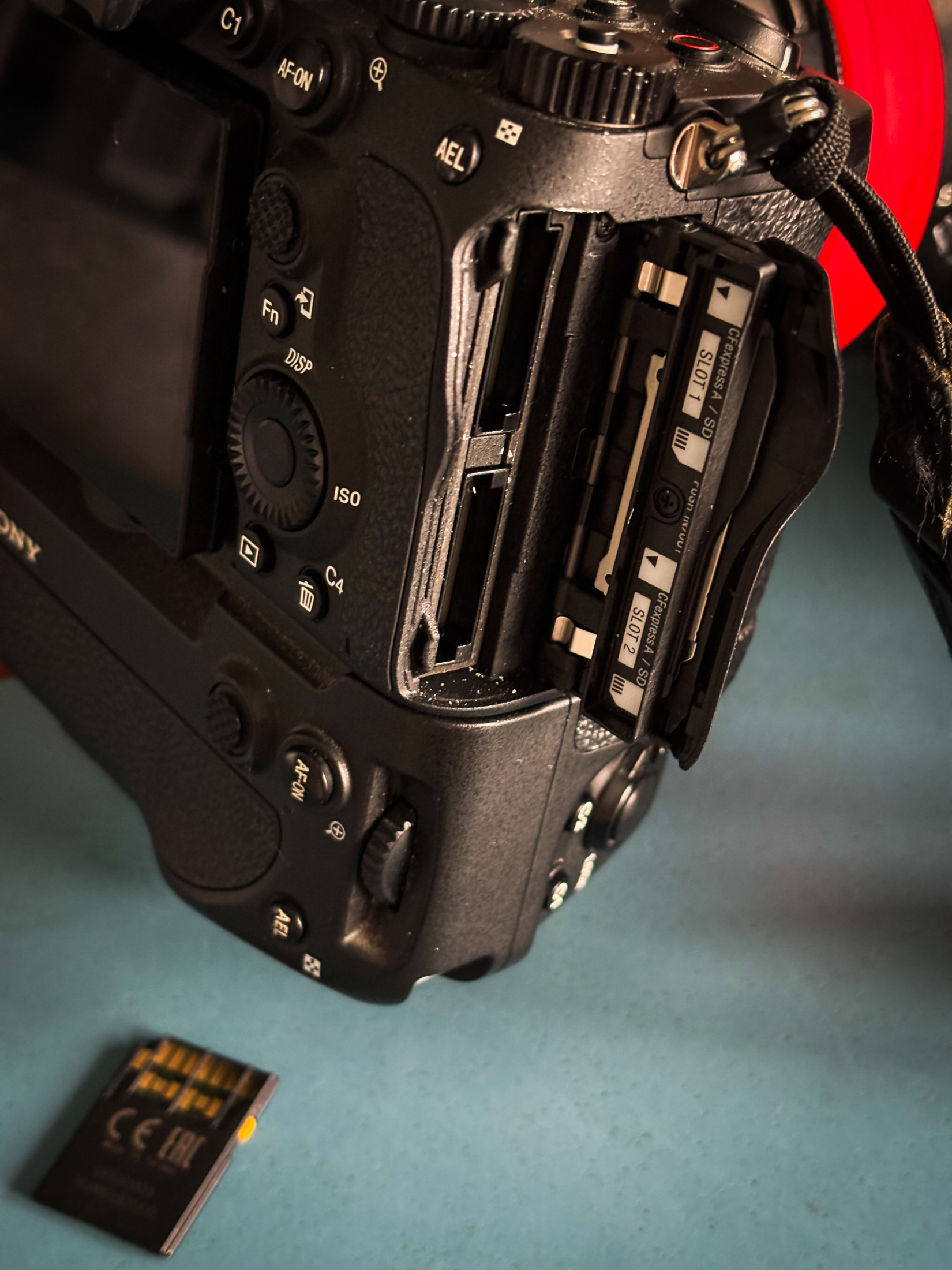
As you can see, my camera has two slots.
This means you can use 2 cards at the same time. So you could set it up in Video vs Photos. Just as a second card or a mirror solution.
So there we have option 1.
Option 2
When we choose the software to shoot tethered, in my opinion, we must have an option to also store images somewhere else than only the software. For years, we had a problem with certain software solutions that would not store the images on the card but only on the machine you’re connected to. Although this is not ideal, it is pretty safe. But I would always add a small script that makes backups during the shoot to an external drive.
Option 3
Better is software that is designed to be safe with tethering.
I’m mostly using Cascable for tethering.
This is a super handy app that since the last update, runs on both my iPad and MacBook Pro.
The reason I love Cascable so much is “they got it”.
Within Cascable I can shoot into the “sandbox” but also add external folders, for example a folder “tethering” on my iPad which I can use to import the photos into Lightroom or just copy them via my MacBookPro to the NAS.
And, today this actually saved my photoshoot and a photography catastrophe was avoided.
In all the years I’ve been shooting I’ve only had a card fail on me once.
And today was card number 2.
Normally this could mean panic! Since you lost all your images.
But in this case I just grabbed my iPad and copied all the RAW files from there.
And that’s why I want to give some extra attention to RAW.
Why shoot tethered with a cable?
For ever people have been asking me “Why don’t you shoot wireless?”
And over the years I’ve tried many solutions, varying from totally useless to “works like a charm”
The only problem… You cannot shoot RAW. Well ok you can but it’s incredibly slo0000w.
So in the situations where I shot wireless I always shot RAW on the card(s) and sent 2MP JPGS over the air. In all honesty, with a proper system this works great and is super fast. But the biggest problem is….It’s not safe at all! Yes, you can use the double card trick on some cameras but not all cameras support this.
Also, because you’re shooting JPG, using presets for your client or doing quick in-between retouches, are out of the question.
So the cable for me is a vital part (till they solve the speed issue).
Conclusion, avoid a photography catastrophe!
Our digital files are much more in danger of loss than we probably realize.
Always make sure you have a proper backup of your stored files, but also always make sure you build in fail-safes during your photo shoots.
Hope this helps some of you before you find out about this article after losing your images.
For more info about Cascable see www.cascable.se
Want the best tethering solutions? check www.iqwire.nl