Bias X review
Bias X
People who are just even a bit interested in playing guitar will most definitely know the brand Positive Grid.
They have been on the market for years and, among other gear, are responsible for the amazing Spark series. A series of amps that vary from pocket to gig size. All running “the same” software, meaning you can buy several and just use your favorite amps, cabs, mics, etc. When they asked me to beta test their new Bias X software I was of course more than interested, but wanted to do the review slightly differently.
Now, let me first set the table for my view on this.
My first company was a recording studio, which I ran with a friend. This was way before photography and was loads of fun. But I also learned some very important things about how amps, mics, and gear work, and that spoiled me for the rest of my life. So please read this review with that in mind.
I’m a tube and vintage gear lover
When I record my music, I’m mostly using a nice selection of tube or tube based amps. I’m running this into a Torpedo CaptureX where I can select my favorite cabs and mics and play with the placement. This is a sound I absolutely love and in my opinion, with the right IR’s, it’s better than I can do with mics and cabs. Plus, you have loads of options and you don’t have to walk to the cab to change mics…..
Ok, let me rewind.
We are beginners, right?
Ok, sorry I got a bit carried away.
In the early days, it was simple.
You have a guitar, cord to some effects, you just cranked your tube amp, put a mic (or maybe two) in front of your speaker cabinet, and you’re done for recording or playing live.
The biggest disadvantage is, without a doubt, reproducing the same sound again, and not even thinking about the immense volume of a cranked 100W tube amp. Ever heard a jet take off…. yep that’s about it. People are often running away when they hear a tube amp on full blast. So very soon, we started fixing this with boxes to place the cabs in, and this was a huge step forward, but still…. So, we started using power soaks, special devices you put between your power amp and cab that takes away a lot of the sound. In essence, this is a great solution and brings the volume down to bedroom level while blasting a 100W tube amp (no heating needed in winter). But….. tubes are getting expensive and less easy to get. Also, people being able to bias your amp to perfection are literally dying out.
But we have a solution for you.
When I was in my teens, I bought a VG88 from Roland.
This was an earth-shattering device for the time (I still have it and it still rocks). Combined with a midi pickup and normal output, making it possible to do almost everything you would like. Want to experiment with a pickup on the neck?… no problem. Want the bottom 3 strings to be harmonized? No problem. It was awesome. But sound-wise… well, it’s oil in the effect area, but nothing comes close to a tube amp. But…. we are now in 2025, right?
A lot has changed
Let’s skip a lot of in-between stuff, maybe one day I’ll do a podcast 😀
Nowadays, we have loads of options called modelers.
When they started, they sounded ok, but they never even came close to a tube amp. In fact, not even close to a solid state amp. It was almost laughable. But when we look at bands today, most are using so-called modelers, and the new generation of players probably never saw the inside of a real studio and record most music at home on a laptop.
This is why I started the review with something about myself.
My home studio consists of an X32 console (with sliders) and 2 racks of outboard cheap vintage gear. This inspires me much more than a plugin, and in my opinion,n even the cheap gear sounds different/better than plugins.
But I have to be honest, also.
When I look at the IR (captures of real devices) of speakers and mics is insane, and makes a huge difference. Plus, you can now record your amp and signal chain perfectly, but leave the final part open. This is how I record most of my songs: one track is the signal totally processed, and one channel is the same signal chain but without the emulation of the cabs and mics. This means I can always change my sound completely after recording without having to re-amp (send the signal through the chain again with different settings), or even worse, play it again.
So, for speakers and mics, I think IRs really caught up. With amps, I still think the advertising text “we are now finally as good as tube amps,” which I have been seeing since the 80s, is not true at all, but is it important?
Sometimes things are inspiring
When I walk through a boring city, there is not much to shoot, but when there are cool people, great architecture etc., it becomes much more easy to take a great shot. A model in jeans and a tank top is not that inspiring.I can still take a great shot of them, but it doesn’t really do anything for me. Now when the model is wearing a great dress, we add some cool lighting and smoke…. well, let’s take a look.

As you can imagine, shooting something like this is way more inspiring and even pushes you towards things you would normally never do. And this is what makes Bias X and also the Spark Amps so incredibly cool.
PLAYTIME
Normally, we are really busy. There is always something that needs to be done. So, when I pick up a guitar, I want to start playing immediately. At home, my whole studio is set up like this, but if I want to change amps, I have to change cables, when I want to change effects… etc.
Also, when we are traveling, I can’t bring all my gear, but what if inspiration strikes, or you just want to relax and play some music?
The Spark Amp is awesome for playing to relax. Personally, I tried recording with it and it’s fun, but it’s very limiting in processing, and this is why I absolutely LOVE Bias X. And therefore i wrote this Bias X review.
Bias X finally
Ok, sorry for the long intro (hope you enjoyed it).
Bias X is software that runs on your desktop as a standalone or a plugin.
Just like with Photoshop/Lightroom, you can add plugins in the form of effects or even whole emulations like BiasX. And this makes BiasX incredibly powerful. Now, let’s first make sure you know that there are a lot more solutions like this, but they don’t all have the same interface, performance, and gear.
This is really where Positive Grid shines.
Although you might not see the real names of the amps, you can probably guess in a second which amps they try to emulate. And in all honesty, I like this approach a lot more than always trying to emulate a Marshall Plexi. Well, good luck finding two Plexis that sound the same. Or a fuzz pedal (not my thing). So, why claim a JCM800 when you can just grab the essence of the Marshall sound and build a kick-ass rig around that sound? Well, that’s exactly what BiasX does.
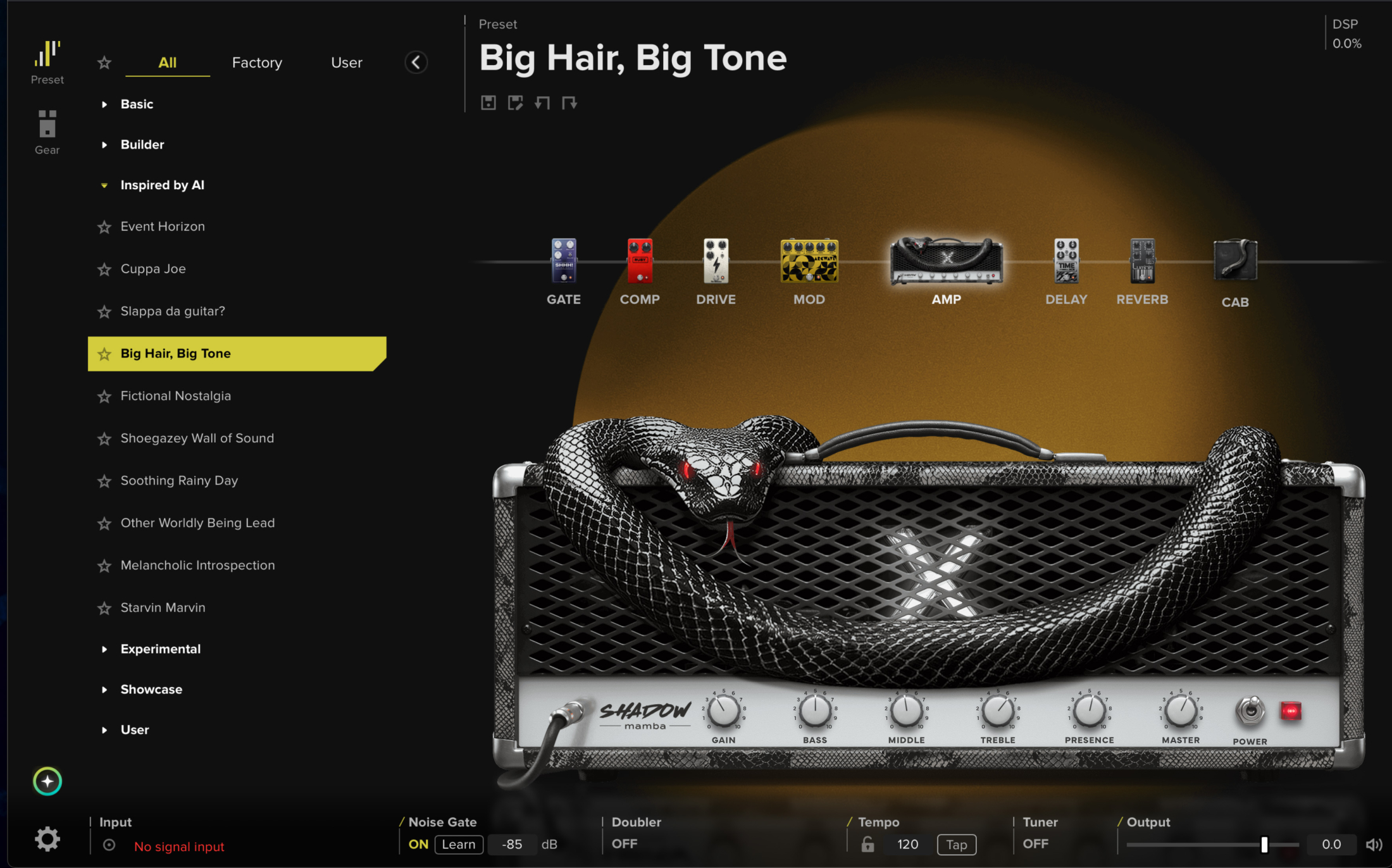
Now don’t worry, if you don’t know anything about mic placement, amps, etc.
Just look at the description of a preset, and you will probably figure out what it is, and otherwise, you just select another preset. And trust me, this goes a lot faster than when I change amps or presets in my gear.
AI assistant
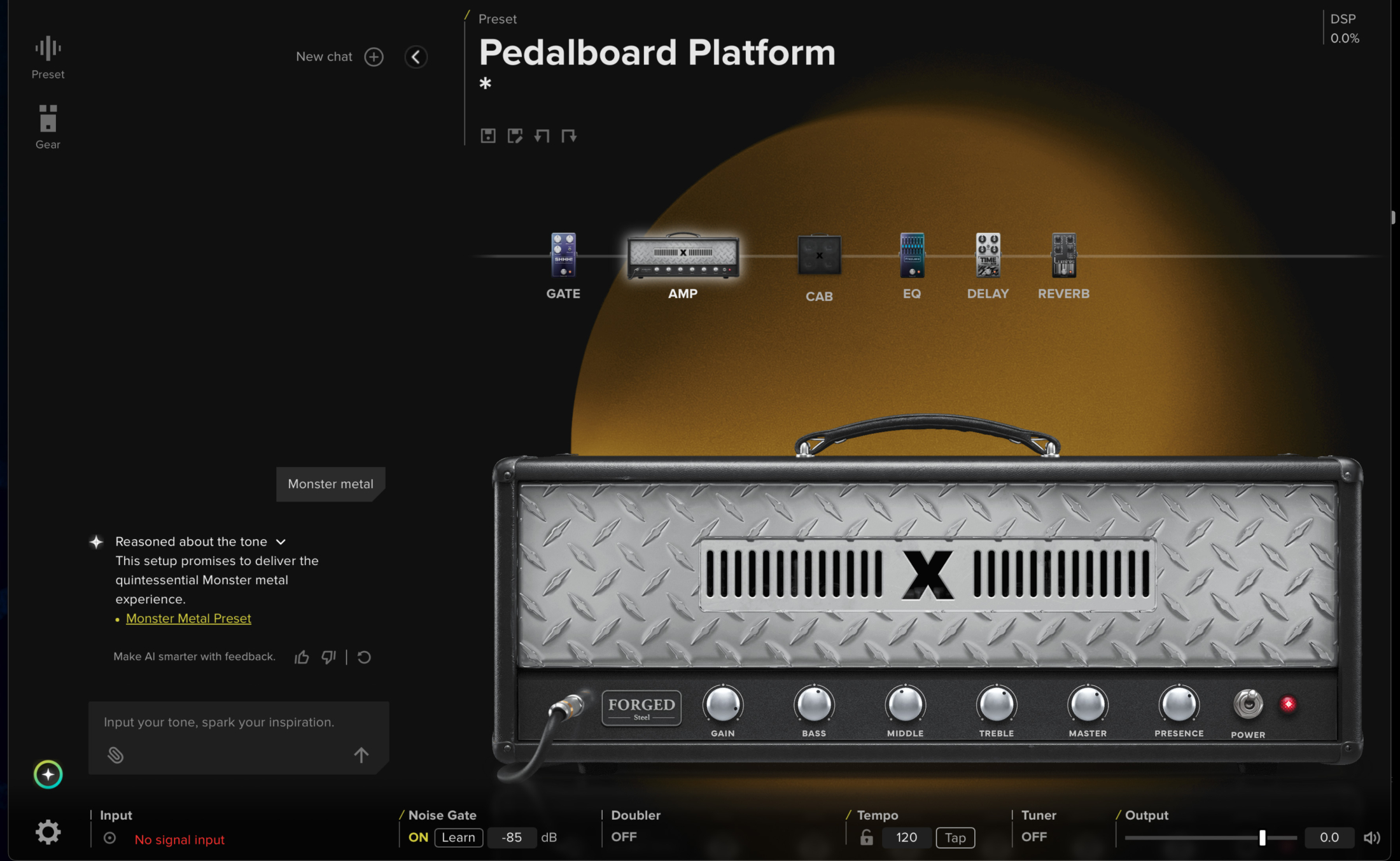
And if you really don’t know what everything means but you do have an idea…. You can use the AI assistant.
The cool thing is that it’s actually a sort of chatbot inside the app that not only gives you a custom-built preset and settings (which you can change) but it also gives you a HUGE list of WHY it chose this combination, what it does, etc. This is a huge learning tool for starting players that still have to learn how a compressor works or where you should place what (btw, for special effects, you can change the order all the time, there is no real order that is 100% fixed)
And even if you know exactly how everything works (do you really :D) it’s so much fun to follow the example of Vai and just ask for a big scary monster sound, the results are sometimes terrible, and sometimes so terrible they are awesome, But most off all this function might learn you to use effects and settings in a different way.
If you just ask it to give you a great rock blues tone, the results vary but overall they are all great starting points, it all depends on your taste. And also here I found myself sometimes using presets I would normally never try. You do have to be careful, before you know it hours have passed.
But I want more….the Bias X review continues
I 100% agree, presets are cool, AI presets are often cool. But as Freddie once said, “I want it all, and I want it now!”
Enter BiasX, the tweak area. And now it’s getting REALLY cool.
Do remember we are still talking about using software on the desktop or within your DAW.
On the desktop, it’s simple. You can load your favorite YouTube video and jam along with all the presets, but when we start to use it in a DAW, it gets really interesting, also for the traveller who only demands the best quality and laughs at emulations (they are out there).
For my examples, I’m using a NUX PM3 interface, which is a modeler headphone amp of ok quality. But the nice thing is that it supports a dry out. Meaning you can get a DI (Direct IN) track of your guitar. As a beginner, this might not mean much, but let me explain why this is huge.
Dry out rocks
When I record my music, I want to use my tube amps and vintage gear.
But when we travel, or when I’m playing in the garden, I’m just connected to my laptop running BiasX with the NUX. This is, of course, not my tube amp sound. But what if I nail that solo in a way I could never recreate, or what if…. There are so many things that can happen. Because BiasX can run as a plugin and my interface supports a dry out, I can now just record my guitar as dry as possible and use BiasX for all the goodies and smoothness that inspires, and I don’t have to worry about my sound.
I now have several options.
First, I can just leave it as is, but because it’s a plugin, I can go into the software and tweak my guitars while playing the recorded song and guitar parts. This is a huge improvement over doing it the old way with EQs and gear right when recording. Let me take Photoshop as an example again. This is like working on a RAW file instead of a HIGHLY compressed JPEG with clipped shadows and highlights and a very wrong color temperature. It might sound weird, but when you play alone, the sound of your guitar might sound awesome but it will probably not sit well in a mix. So, being able to work on the 100% RAW guitar signal and being able to add a heavy metal tone or a super clean sound or copy the track and do both is insanely handy. By the way this is nothing new, loads of apps and modelers can do this, but it is a very strong point for making use of a dry out while recording on the road.
But so far, we are still working in the box, or, in other words, something I might not want to do for my final results.
Well, that’s where we have to leave Bias X for a second.
Remember that dry track?
With a so-called Re-Amping box, you can send this signal out into your amps. The amps are then recorded, and voila, your perfect performance is now played via your tube setup. This means it doesn’t matter anymore when or how you play something and with what sound you can always reroute it. But that doesn’t mean we don’t use Bias X anymore, it can actually be the opposite. Let’s take a look at how we can use Bias X even in a tube amp workflow.
So many effects
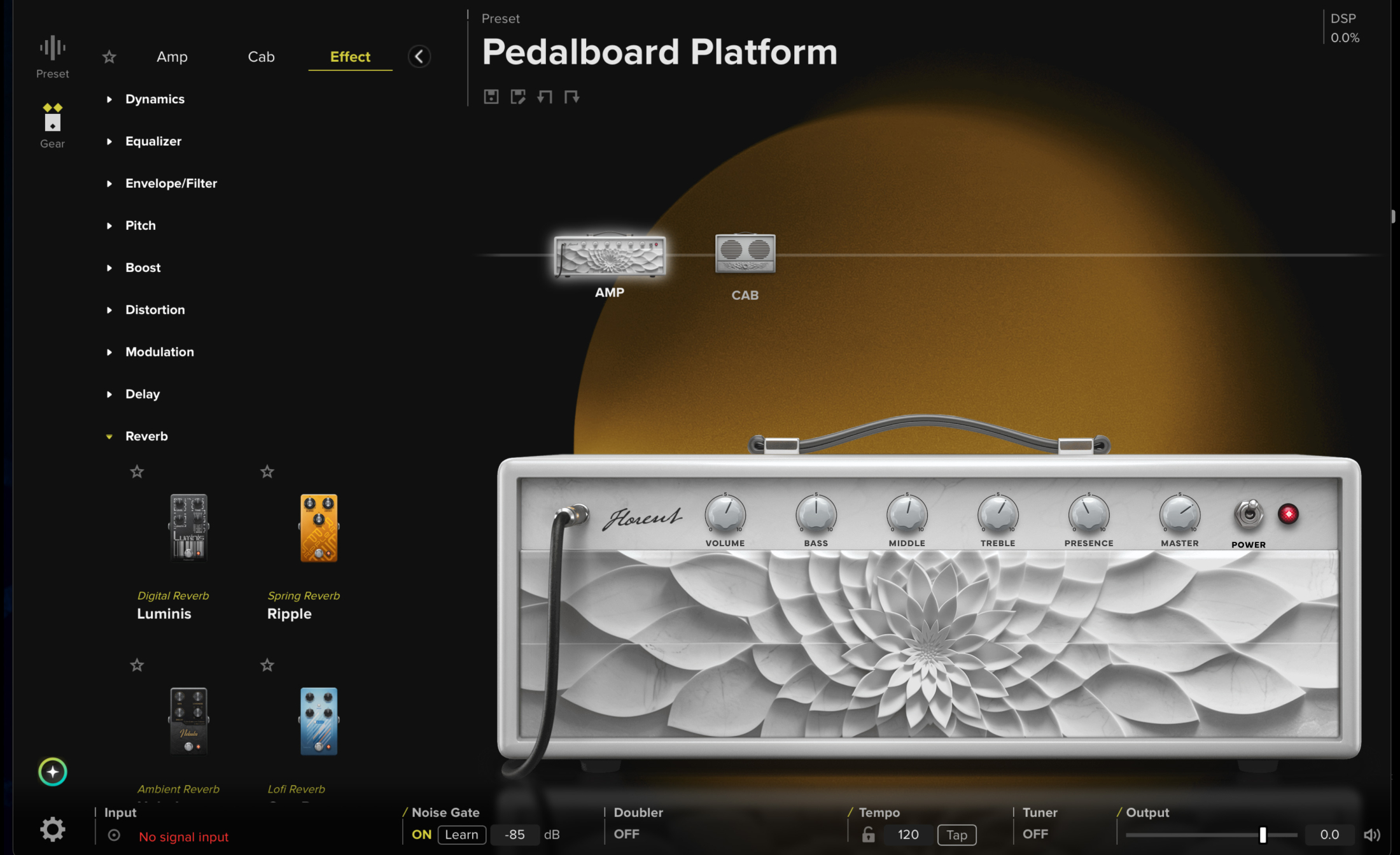
As you can see, there is a lot to choose from.
The cool thing is that they often add extra amps, cabs, gear, etc.
And you can even add your own IRs to add an extra layer of flexibility.
So you can create complete setups from pedals to amps to cabs with mics and even some studio effects. No need for anything else.
Let’s add another one you might not have thought about. But I will explain next.
We talked about traveling and being able to record studio-quality tracks via re-amping. And this doesn’t mean the internal quality is not great, don’t get me wrong (later more about this), but sometimes we just prefer vintage tube amps for the overdriven or point of break up sounds.
Going hybrid
You probably know the term “going hybrid”.
This is about 100% my studio. I love using software and in-the-box effects. But I also own a console and external gear. This is going hybrid: a mix between external gear and in-the-box. But did you ever think about doing this with software like Bias X?
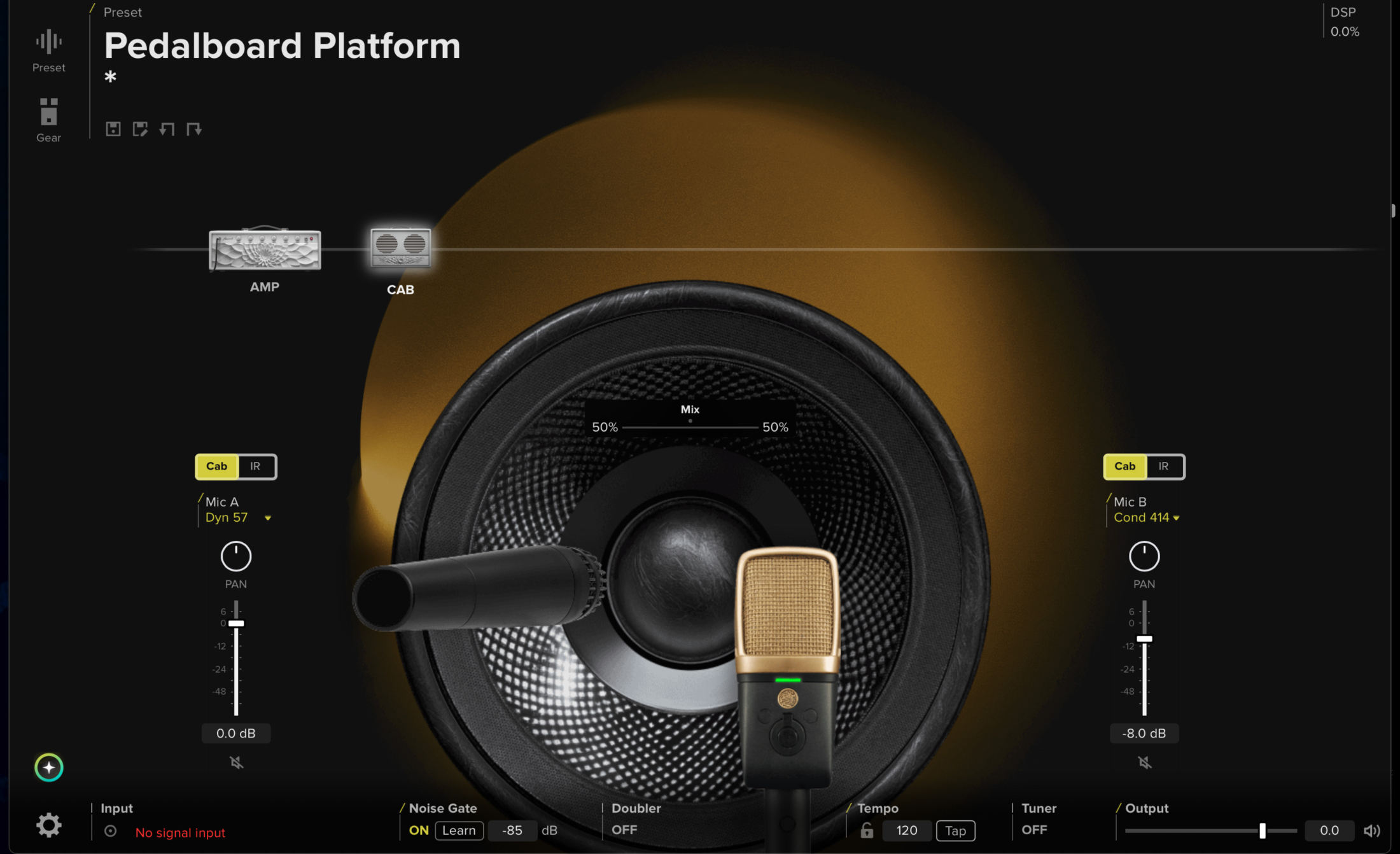
As you can see, Bias X has a huge selection of effects, cabs, mics, and amps.
But this doesn’t mean you can only use it in Bias X, of course.
When I started testing BiasX in the beta period, I really liked the amp simulations. Especially the cleans and point of break-up were very nice. But I also loved the amount of effects like delays and pitch shifters, and although I liked the amps, I wondered how it would sound with my own amps. And seeing you can also select just effects in your digital setup (just disable the amps and cabs), I saw no reason this would not work, and indeed it works like a charm. And this is actually how I now use Bias X at home most of the time, the build in effects are great, plus mixing Digital effects with vintage effects just opens up a lot of possibilities to create effects that would normally be very hard or expensive to emulate.
And that’s not all (by a long shot)
There are so many things you could do with Bias X besides what I already mentioned, but there is one I haven’t yet mentioned.
When I record, I use a 3 track method. One track processed with cab emulations from a torpedo X, one track without cab emulation and I also run a dry-out track. One might call it overkill, but it’s the digital world, and it’s possible. So, why not :D?
By recording it this way, I have a huge selection of tools to get the sound I want.
First, I can use the processed track as it is or shape it with EQ and add effects.
But I can also use the unprocessed pre-amp track and use different cabs and mic placements with the software.
And, if that doesn’t work, I still have the dry track that I can re-amp or…. run through Bias X to get the sound I want.
Closing thoughts on my review of Bias X
It’s a longer article than I intended, and I still have the feeling I didn’t tell you everything. So, let’s see if I can compress that in my final thoughts.
When you love playing guitar, from just jamming to recording your next hit, it’s incredibly limiting when you cannot record at the moment you want it. But it’s also frustrating when you record something really cool and the sound is terrible. I think Bias X solves all these problems even for the most critical players that only want to use vintage/modern external gear.
The only thing you need to start is a guitar, a simple interface, and the Bias X software.
Now, I’ve not told you how I think the amp simulations hold up to the real deal.
In my experience, the digital emulations all have something “different” in the higher frequencies. It’s probably the way that natural harmonics are created, which is very hard to emulate (I guess). Also, with tube amps, you can buy 10 amps and get 10 different sounds, but with the same “family feel”. Like most people can hear a Strat style guitar vs a Les Paul, but they can’t hear if it’s a Gibson or an Epiphone in a mix. And when you use them in the mix, I can already tell you that probably no one will say “hey that’s not a Plexi”, they will probably go like “Dude, a Plexi, that’s so cool”…. In the mix modelers now a days are incredibly good and remember I’m just playing as a hobby and although I love the feel of a tube amp and it’s a huge inspirational thing for me, I would probably also not be able to pick out Bias X or my own gear in a full mix.
That being said, I’m having a blast with Bias X, the presets inspire new ideas, and the amps capture the family feel they try to emulate pretty good as far as I can tell.
When I tweak the software I can get very close to my own tube amps. And I think this is something you do have to realize, the stock presets are nice, especially the clean ones are great, but you can get a lot more out of the software if you take a little bit of time with tweaking the cabs and mics. And for me personally I pulled down the gain on most amps and that gave me sounds very close to my own gear. 😀
Guitar tone?
At one point, you also have to ask yourself the question, “What is guitar tone?”
When you try to get a tube sound out of software, I think we will probably never really get there, but I’ve got some really cool guitar sounds out of Bias X that I would never be able to get out of my own gear. Also, I can’t own all the amps I love, but with Bias X I can own the amps I love for my main parts and use Bias X for all those extra parts where you need a Fender twin sound.
Oh, and did I also tell you already you can play bass with your guitar 😀
I want to thank Positive Grid for inviting me to test out their new software.
And I want to guarantee you, as a reader, that all the opinions are my own and not influenced by being able to beta test the software.